Managing git credential with Git Credential Manager
A brief introduction about Git Credential Manager
Nowadays most people use either ssh protocol or https for git usage. When using git over https, we need to provide personal access token to authenticate our development laptops to remote repository. Git Credential Manager is a tool written in .NET that help you manage these tokens with ease.
It provides a nice GUI interface for you to enter these credentials so you don’t have to bother with typing terminal commands via the keyboard. The tool is cross-platform, which means you can run it in macOS, Linux and Windows. This is useful in case your organization has many developers using different operating systems and you want to enforce a standard, consistent way for them to authenticate to remote repositories.
How it works?
Once installed, GCM will be called implicitly by git. For example, when you use git (git clone / git push / …) to a remote Gitlab, Azure, Bitbucket or Github repository, it will automatically open a window guiding you through the authentication process. Next time you use git in the same repository, GCM will reuse the existing credential you provided until it becomes invalid.
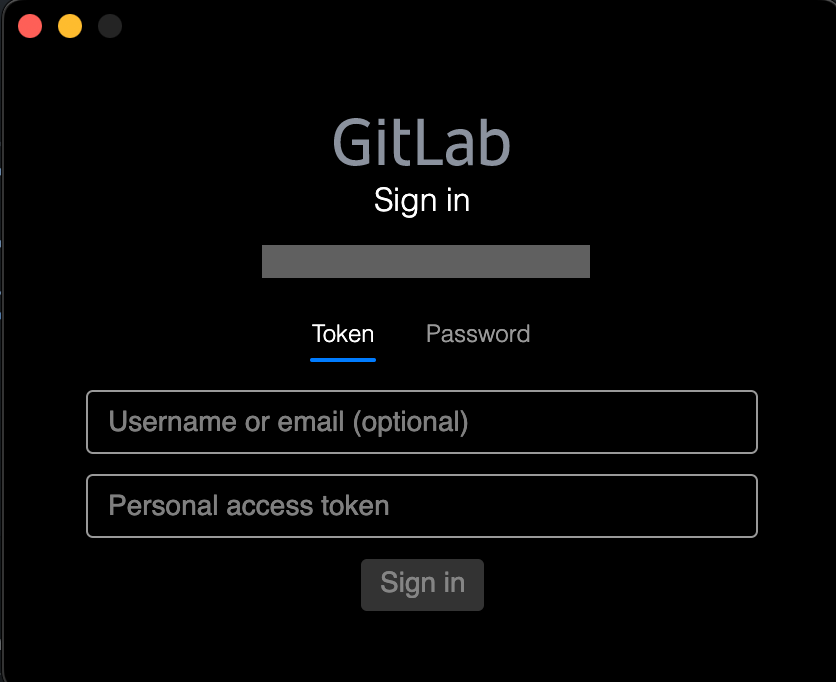
Git Credential Manager GUI
Command line usage
There will be times you need to view your currently-stored git credentials or erase the current one. In such cases, you can you the following CLI.
View a stored credential
Enter git-credential-manager get, enter and then type protocol=https , enter again and type host=<remote repo host> and then enter twice.
For example:
git-credential-manager get<↲ ENTER>
protocol=https<↲ ENTER>
host=gitlab.com<↲ ENTER>
<↲ ENTER>
Erase a stored credential
Enter git-credential-manager erase, enter and then type protocol=https , enter again and type host=<remote repo host> and then enter twice.
Example:
git-credential-manager erase<↲ ENTER>
protocol=https<↲ ENTER>
host=gitlab.com<↲ ENTER>
<↲ ENTER>
You can read the full command line usage here https://github.com/git-ecosystem/git-credential-manager/blob/release/docs/usage.md.
I hope this is helpful to you. Happy coding! 🚀.